
EXPERIMENT 03 / 已发布 · v1.1.0
ACE LowGear.
启动时设置,核验后退出。
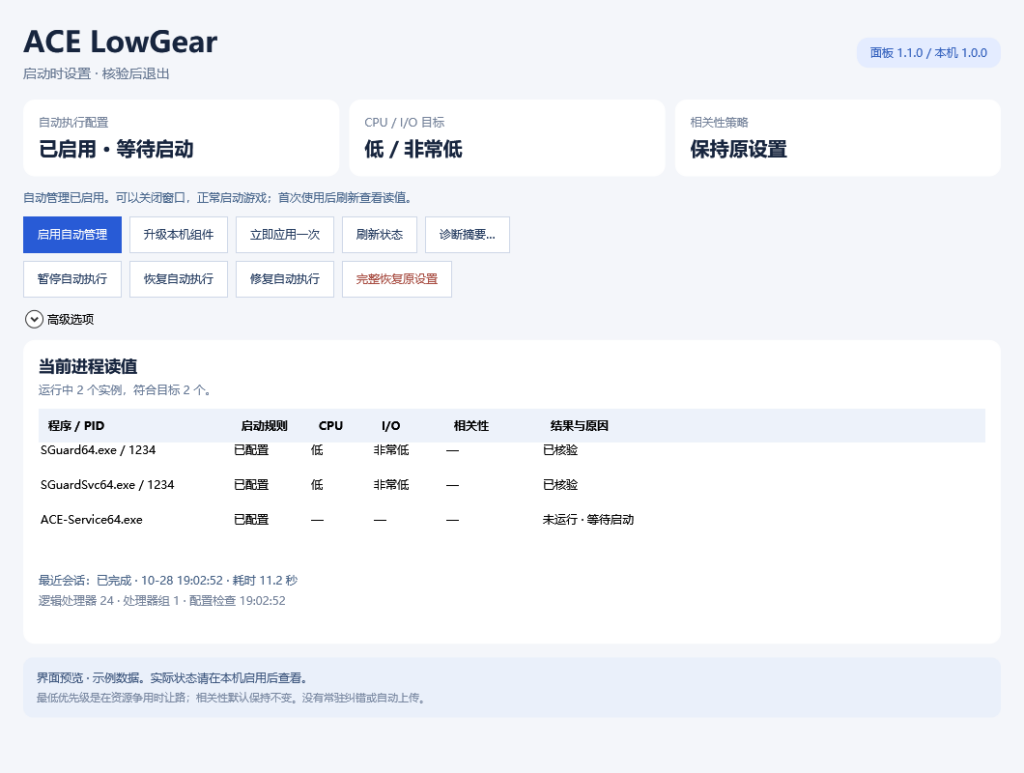
设置、核验、恢复。
每次启动,执行一次。自动任务处理当前 ACE 实例;会话结束后不持续纠正,需要时可在面板中立即应用一次。
状态,分开看清。启动配置、实际 CPU / I/O 读值、最近会话分别展示。程序未运行或查询失败时,显示实际状态与原因。
保留最早原值。支持暂停、恢复和完整恢复原设置。1.1 增加保留原始备份与策略的无损升级,以及手动修复和脱敏诊断摘要。
启用一次,照常使用。
① 下载并完整解压。从 GitHub Releases 下载源码 ZIP,完整解压到普通文件夹。
② 打开控制中心。双击 Start.cmd,允许管理员提示,点击“启用自动管理”。
③ 正常启动游戏并核验。可以关闭面板。首次使用建议启动游戏约 45 秒后刷新状态,确认实际优先级读值。
适用于 64 位 Windows 10 / 11,需要管理员权限。使用系统组件,无需安装 Python、Node.js 或 .NET SDK。
Work when it matters.
ACE LowGear is a Windows scheduling utility for ACE processes. Each time ACE starts, it applies Idle CPU and Very Low I/O priorities, reads them back, verifies and exits.
Enable it once, then launch your game as usual. The panel can stay closed. The next ACE startup begins a new session.
The image above previews the Chinese version 1.1 panel with sample data and the pre-upgrade component state.
Apply. Verify. Restore.
One session per startup. The automatic task handles the current ACE processes. Completed sessions do not continuously reapply priorities; use Apply once in the panel when needed.
Separate configuration from readings. Startup configuration, live CPU / I/O readings and the latest session are shown separately. Processes that are not running and failed queries retain their actual status.
Keep the original baseline. Pause, resume or restore original settings. Version 1.1 adds in-place upgrades that retain the original backup and policy, manual repair and a redacted diagnostic summary.
Enable once. Carry on.
1. Download and extract. Download the source ZIP from GitHub Releases and extract the complete archive to a regular folder.
2. Open the control center. Run Start.cmd, accept the administrator prompt and choose Enable automatic management in the Chinese panel.
3. Launch normally and verify. The panel can be closed. On first use, refresh the status about 45 seconds after launching your game to confirm the actual priorities.
For 64-bit Windows 10 / 11; administrator access is required. Uses built-in system components, with no Python, Node.js or .NET SDK installation required.
Know what changes.
Lower priorities yield during resource contention. They are not a CPU usage cap or a promise of higher frame rates. CPU affinity stays unchanged by default, with optional binding to the last logical processor.
Targets SGuard64.exe, SGuardSvc64.exe and ACE-Service64.exe. The project is not affiliated with ACE.
Backups and runtime data stay on the computer. Preview the redacted diagnostic summary before copying it. Public downloads contain source, documentation and tests.
The current public version is 1.1.0. Installation, upgrades, restoration and the validation scope are documented in the repository.