 浮算空间
浮算空间EXPERIMENT 01 / 实验阶段
AI Passport · 课表.
把课表,从手机里拿出来。
9 月 18 日, 2026
08:00 — 09:35数学
A 楼 · 302 教室。虚构示例课程:微积分。
10:00 — 11:35编程
实验室 · 205。虚构示例课程:编写第一个程序。
网页界面为示意,数据均为虚构。实际固件界面可能不同。
一块小设备。
做好一件小事。
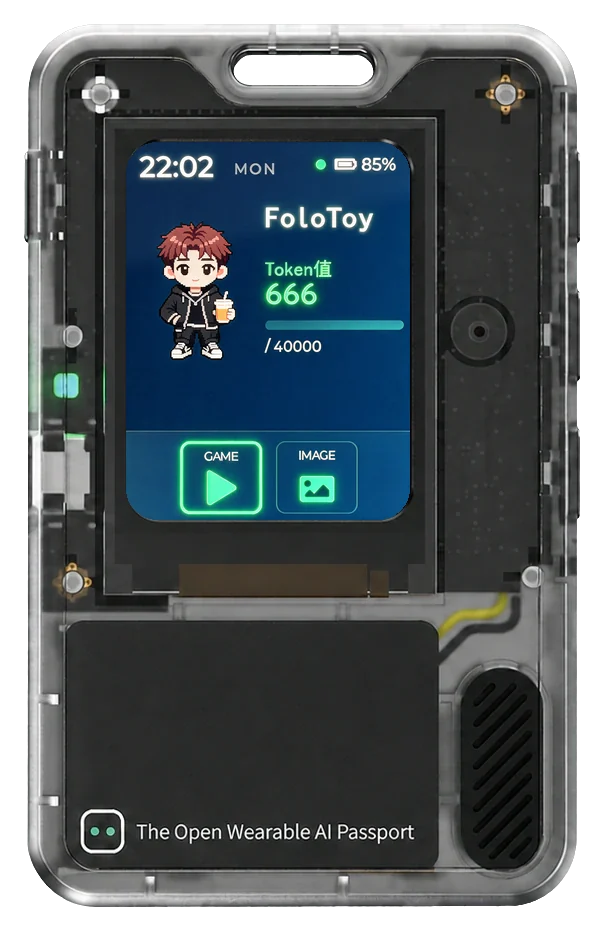
一个为 AI Passport 编写的固件实验,让小型嵌入式设备成为专用的个人课表屏幕。
这个项目探索一块简单的硬件,如何安静地融入日常、随时可用,而不必再添一块大屏幕。
换一种方式
让屏幕融入日常。
课表的信息不多,却每天都要看上几次。查看它,未必需要手机、应用或网络。
第一次尝试只给 AI Passport 一项任务:把当天的课程放在手边,让时间、地点和详情出现在一块实体小屏幕上。
03 / 架构
用简单的路径
把数据带到屏幕上.
Windows 安装工具可以导入并预览带有明确日期的 ICS 或 CSV 课程。课表保存在设备中,无需联网即可查看。
通过 USB 同步时钟,也支持可选的 Wi-Fi 校时。完全断电后,需要重新同步时间。
看看实验的内部。
- 设备
- FoloToy AI Passport · ESP32-C3 · 8 MB Flash
- 显示屏
- 240 × 320 · LVGL · 支持中文字库
- 固件
- ESP-IDF · 离线每日课表
- 课表输入
- 带有明确课程日期的 ICS / CSV
- 操作方式
- 上下键选择课程;确认键打开详情;长按上下键切换日期
- 桌面工具
- Windows x64 预览版安装工具,支持课表预览与 USB 校时
Windows 安装工具为预览版。循环课表需要先展开为明确日期才能导入。上设备前,请阅读仓库中的安装与兼容性说明。
One small device.
A focused purpose.
A custom AI Passport firmware experiment designed to turn a small embedded device into a dedicated personal schedule display.
The project explores how a simple piece of hardware can become a quiet, always-available part of everyday life without needing another full-sized screen.
A different kind
of everyday screen.
A timetable is a small piece of information that is useful many times a day. It does not always need a phone, an app, or a network connection.
This first build gives the AI Passport one focused role: keep the day’s lessons nearby, with times, places, and details on a small physical screen.
03 / ARCHITECTURE
A simple path
from data to display.
A Windows installer imports and previews explicit-date ICS or CSV lessons. The schedule is stored on the device and can be browsed offline.
USB synchronizes the clock. Optional Wi-Fi time synchronization is supported; complete power-off requires the time to be synchronized again.
Inside the experiment.
- Device
- FoloToy AI Passport · ESP32-C3 · 8 MB Flash
- Display
- 240 × 320 · LVGL · Chinese font support
- Firmware
- ESP-IDF · offline daily timetable
- Calendar input
- ICS / CSV with explicit lesson dates
- Controls
- Up/down selects lessons; OK opens details; hold up/down changes dates
- Desktop companion
- Windows x64 preview installer with calendar preview and USB clock synchronization
The Windows installer is a preview. Recurring calendars must be expanded to explicit dates before import. Read the repository’s installation and compatibility notes before using it on a device.
Keep exploring.
The source, development notes, and current validation status live in the project repository.